
When you first start a blog, hitting “publish” feels like the finish line. You spent hours drafting, editing, and finding the right header image, so by the time you reach the sidebar settings, it’s tempting to skip the little boxes labeled Categories and Tags and just push the post live.
After all, your latest post sits right at the top of your homepage. People will see it anyway, right?
Well that is the way I thought about tags and categories for the first ten years of blogging but one day I discovered that I had been blogging for ten years with a very low …disgustingly low..reader response and it set me to thinking.
I had always operated on the idea that if you write it and it is on the internet, people will find it and read it.
I could not have been more wrong. So you think that people will see your blog posts for no other reason that you have it on your front page in first position? Wrong, wrong, wrong,
That works fine when you have five posts. Once you hit fifty—or two hundred—things start to get messy. Without a system to group your writing, your older work disappears into a chronological black hole. Good content gets buried, and new readers have no easy way to find the exact answers they came for.
Taking thirty seconds to add categories and tags isn’t just busywork for neat freaks. It actually changes how people read your site and how search engines understand it.
The Difference Between the Two
Before getting into why they matter, it helps to treat them like a physical book.
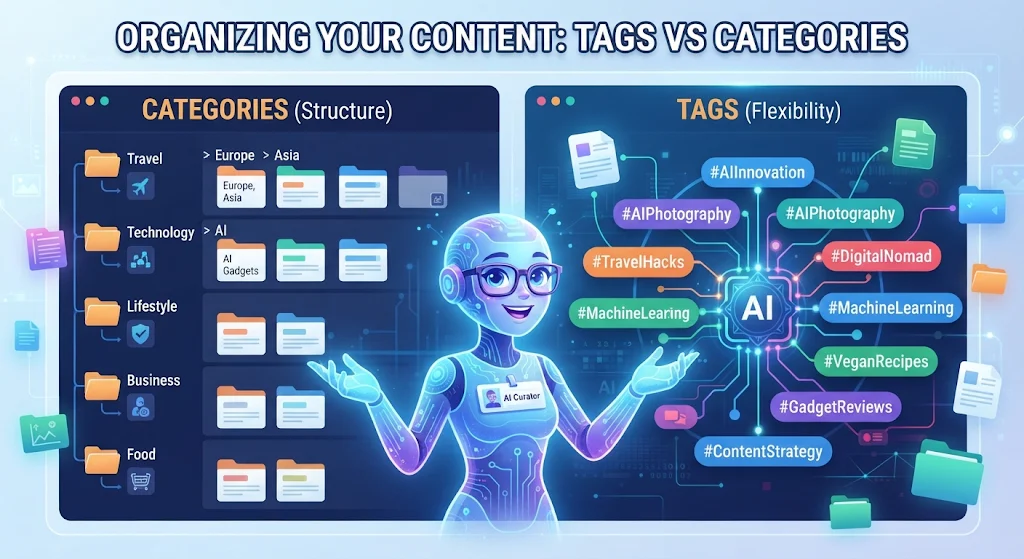
Categories are your table of contents. They are broad, overarching buckets that define what your blog is actually about. If you run a food blog, your categories might be Breakfast, Dinner, Desserts, and Kitchen Gear. Every post belongs in at least one, and you usually want to keep this list fairly short.
Tags are the index at the back of the book. They describe the specific details inside an individual post. That Dinner recipe might have tags like chicken, 30-minute meals, gluten-free, or slow cooker. A post can have several tags, and they often overlap across completely different categories.
They Keep Readers Clicking Around
Think about the last time you landed on a blog from a social media link or a quick web search. You read the article, liked the writer’s voice, and thought, I wonder what else they’ve written about this.
If that blog has clickable categories at the top of the page or neat little tag pills at the bottom of the post, you’re one click away from a whole list of related reads. If it doesn’t, you probably hit the back button and leave.
Tags and categories turn a single page view into a mini-binge. When someone reads a post about fixing a leaky faucet and sees a tag for weekend DIY, they might stick around to read your guide on painting kitchen cabinets, too. The longer someone stays on your site, the more likely they are to subscribe to your newsletter or remember your name next time.
Search Engines Use Them as Roadmaps
Search engines are smart, but they still rely on structure to figure out what your website is all about. When automated crawlers scan your pages, your categories and tags act like signposts.
If you consistently publish posts under a category called Personal Finance and frequently use tags like budgeting and index funds, search engines quickly connect the dots and recognize that your site has depth on those topics.
Plus, every category and tag automatically generates its own archive page—a dedicated URL listing every post filed under that label. Over time, those archive pages can actually rank in search results on their own, bringing in readers who are looking for a broader collection of articles rather than one specific post.
They Save You From Writing the Same Thing Twice
Once you’ve been blogging for a year or two, your memory starts to blur. Did you already write about how to clean cast-iron skillets, or did you just mention it briefly inside another post?
When you use tags consistently, your own dashboard becomes a searchable database. A quick filter by tag shows you everything you’ve ever published on a subject. It keeps you from accidentally repeating yourself, and it makes linking back to your older posts effortless—which, as a bonus, is another great habit for both readers and search rankings.
A Quick Rule of Thumb
You don’t need to overthink this. Keep your categories broad and limited to around five to eight main topics so your navigation menu stays clean. Use tags a bit more freely, but try to stick to words you’ll actually use more than once. A tag that only ever applies to a single post doesn’t help anyone navigate.
And remember this: “Can the artificial intelligence devices be trusted to provide proper seo friendly tags for blog posts? I cannot give a general answer to that but I can say that in my own case they have been most helpful and time saving.
It’s a tiny habit at the end of your writing routine, but your future readers—and your future self—will be glad you bothered.

